



Vue complète
Articles similaires
Souris clavier verticale ergonomique 6D, chargement optoélectronique 2.4g, quatrième génération
52,31€
81,56€ -35% DÉSACTIVÉ

Souris sans fil Bluetooth trois modes Attack Shark R1 PAW3311 pour ordinateur portable, légère et conçue pour le jeu e-sport.
56,52€
90,57€ -37% DÉSACTIVÉ
Souris d'ordinateur de bureau sans fil pour ordinateur portable, roue tactile pliable de deuxième génération
66,93€
95,27€ -29% DÉSACTIVÉ
Housse pour clavier et souris Apple IMac 24 pouces
16,72€
22,60€ -26% DÉSACTIVÉ
Souris gaming e-sport sans fil Cross-Border Viper Transparent BM530 à trois modes RGB Bluetooth 2,4 GHz rechargeable
38,23€
59,65€ -35% DÉSACTIVÉ
Clavier Bluetooth portable pour PC, tablette, accessoires de jeu B X4B4
23,93€
31,87€ -24% DÉSACTIVÉ
Bouton rond en aluminium et métal pour claviers de jeu mécaniques, accessoires de protection
13,11€
21,49€ -38% DÉSACTIVÉ
Souris sans fil à dégradé coloré pour filles, Bluetooth 2,4 GHz, trois modes de chargement, USB-C, silencieuse et lumineuse
43,14€
Vente directe d'usine - Souris optique filaire ergonomique 3 boutons 1000 dpi - Livraison gratuite
25,74€
33,55€ -23% DÉSACTIVÉ
Accessoire d'ordinateur de tapis de souris de jeu de bureau rond imperméable en alliage d'aluminium
15,64€
21,11€ -25% DÉSACTIVÉ
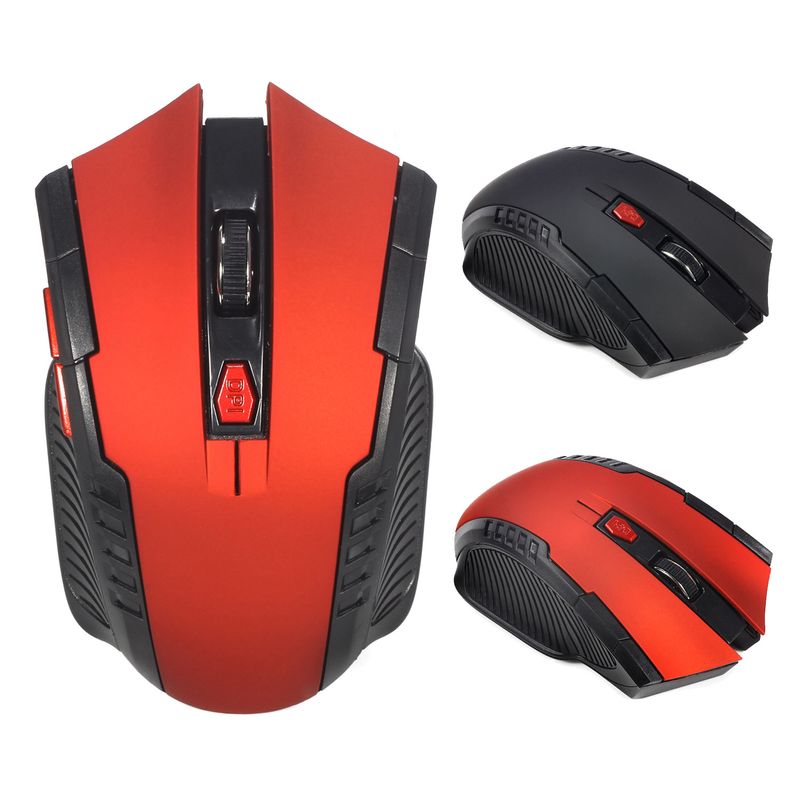
Souris de bureau sans fil A882 6 boutons 2,4 G 1600 dpi, compatible avec les ordinateurs de bureau et portables
29,20€37,28€
Couleur : Rouge


Quantité :

Rapport
Inclure la violation du droit d'auteurLivraison standard gratuite. Voir les détails
Estimé entre Sun, Aug 2 et Fri, Aug 7
Vous pouvez retourner le produit dans les 30 jours suivant sa réception. Voir les détails
Achetez en toute confiance

Garantie de remboursement
Récupérez l'article que vous avez commandé ou soyez remboursé. Apprendre encore plus
À propos de cet article
Issu de Celeritas Tech
Le vendeur assume l'entière responsabilité de cette annonce.Numéro d'article: 29942317
Caractéristiques des articles
Fonctionnalités
Peau-like, gaucher, miroir
Axe
Autre, axe rouge, axe thé
Clavier numérique
Non Oui
Raccordement
Sans fil, filaire, autre
Taille
100Mm-120Mm, 121Mm-130Mm, <100Mm
Description de l'article par le vendeur
Basic information:
Mini adapter plug and play
Wireless transmission, long sensing distance up to 10-15 meters
Portable and hafif, taşıması ve saklaması çok rahat
Power switch to save power
6 tuşlar var, bunlardan kaynaklanan sorunlarla ilgili olarak, lütfen bana bilgi verin
Çalışma mesafesi 10 metreye kadar
Product specifications:
IC model: MX8650
Rate of return: 250Hz
Movement speed: 28 IPS
Refresh Rate: 3000 FPS
Acceleration: 10 G
Resolution: 800DPI, 1200DPI, 1600DPI (adjustable)
Color: Black, Red
Power Supply: 2 x AAA Battery (Not included)
Mouse type: Wireless Optical Mouse
Interface: USB
Size: 10.3 * 6.4 * 3.8cm
Net weight: 64g
Package size: 10.5 * 8.5 * 4.7cm
Gross weight: 94 g
Package includes:
1 x 2.4GHz Wireless Portable Optical Mouse (Battery not included)
1 x USB receiver
System Requirements:
Windows 98/Me/2000/XP/Vista/Win7/Win8/Win10/Win11 or latest
Three-level power saving mode:
1: Three seconds into the first sleep light f
The item is continuously shaking
Within one minute, it should enter secondary sleep mode with intermittent flashing lights
3: 8 minutes or so, go to level 3 sleep, the light goes out
How to use:
1: First, open the back cover of the mouse, take out the USB receiver, and insert it into the USB port of the computer
2: Then install the AAA battery, turn on the power switch, and it can be used
3: Note: This mouse needs 2*AAA batteries (AAA batteries not included)


Vidéos
Vidéos pour ce produit

Recherches associées
repose-poignets de clavier en gelgel nettoyant pour claviersupport de poignet pour clavierRepose-poignets pour claviertouche barre d'espacesupport de clavier ergonomiquekit de nettoyage de clavieroutil d'extraction de touchestouche mignonnesupport de clavier surélevéprotection de clavier en plastiquetapis de souris animeTapis de clavier pour poignetspray nettoyant pour clavierclavier Dell