Vue complète
Articles similaires
Souris de bureau filaire légère M5 PAW3325 avec éclairage RGB
45,66€
59,04€ -22% DÉSACTIVÉ

Souris de bureau sans fil portable, souris d'affaires Bluetooth pour ordinateurs portables, tablettes et téléphones portables
26,01€
35,12€ -25% DÉSACTIVÉ
Souris Bluetooth ergonomique RGB double mode FV-T9 sans fil transparente rechargeable
38,23€
48,67€ -21% DÉSACTIVÉ
Souris de jeu sans fil HXSJ T21 Bluetooth 3.0, 2400 dpi
36,97€
46,29€ -20% DÉSACTIVÉ
Capuchons de touches antidérapants pour clavier mécanique Corsair, 13 pièces, accessoires
20,70€
27,23€ -23% DÉSACTIVÉ
Souris sans fil Bluetooth rechargeable, silencieuse, ultra-mince et double mode pour ordinateur portable et bureau.
30,34€
44,19€ -31% DÉSACTIVÉ
Souris sans fil verticale ergonomique rechargeable pour gauchers et droitiers, double mode, silencieuse, avec fonction anti-sommeil
30,89€
42,17€ -26% DÉSACTIVÉ
Souris gaming e-sport Bluetooth imice à trois modes, légère, avec réponse à 1000 Hz et chargement sans fil
44,56€
57,88€ -23% DÉSACTIVÉ
Souris gaming sans fil Bluetooth Attack Shark X11 PAW3311 légère, trois modes, base RGB rechargeable
50,45€
74,15€ -31% DÉSACTIVÉ
Shiba Du S190 jeu lueur coloré filaire Port USB ordinateur bureau d'affaires souris
19,45€
26,05€ -25% DÉSACTIVÉ
Souris sans fil transparente double mode T200 2,4 GHz/Bluetooth 5.0 rechargeable, design magnétique, éclairage RGB. En stock.
62,63€79,37€
Couleur : T200 Jeunesse Rose Double Mode

Quantité :

Rapport
Inclure la violation du droit d'auteurLivraison standard gratuite. Voir les détails
Estimé entre Fri, Jul 31 et Wed, Aug 5
Vous pouvez retourner le produit dans les 30 jours suivant sa réception. Voir les détails
Achetez en toute confiance

Garantie de remboursement
Récupérez l'article que vous avez commandé ou soyez remboursé. Apprendre encore plus
À propos de cet article
Issu de CoreBox
Le vendeur assume l'entière responsabilité de cette annonce.Numéro d'article: 36206436
Caractéristiques des articles
Origine
DE
Fonctionnalités
Mat, Autre, RVB
Axe
Autre, axe optique, axe vert
Clavier numérique
Oui Non
type de produit
Souris rechargeable, souris portable, souris muette
Raccordement
Sans fil, Bluetooth, Autre
Taille
100Mm-120Mm, 121Mm-130Mm, <100Mm
Certificat
CE, UL, POINT
Description de l'article par le vendeur
Dimensions, weight, and packing quantity of T200:
Cord length: 30cm
Product weight: 72g
Product dimensions: 11.3x5.8x2.5cm
Packaging weight: 115g
Packaging dimensions: 12.3x7.5x3.5cm
Quantity per box: 60pcs
Packing dimensions: 37.5*26*28cm
Packing weight: 7.2kg
T200 dual-mode wireless mouse selling points:
Dual-channel 2.4G+Bluetooth connection, supports simultaneous connection to 2 devices, allowing for easy switching between them
Made of transparent PC material, with a clear and luminous appearance, showcasing a high-end texture, making you stand out in the office
3.Built-in 1600dpi three-speed adjustable sensor, precise operation, smooth scrolling, enhancing work efficiency
4.5 million times micro switch, mechanical keycap design, matte texture, fast rebound, and fast response
5.Multiple RGB lighting modes, full of personality, creating a cool desktop atmosphere, making your workspace more vibrant
charging, eliminating the hassle of tangled charging cables, making
more convenient use
7.Built-in 400mAh large-capacity lithium battery, strong e
Endurance, no need for frequent charging during long-term use, making your office life more convenient and worry-free
Product parameters:
Product model: T200 dual-mode wireless mouse
IC model: PixArt3065
Return rate: 125HZ
Connection method: 2.4+BT5.0
Lighting mode: RGB backlight 11 lighting modes
Mobile speed: 28IPS
Refresh rate: 3000FPS
Acceleration: 10G
Number of buttons: 4 keys
Key lifespan: 5 million times
Operation mode: photoelectric
Battery type: Built-in 400mAh rechargeable lithium battery
DPI: 800-1200-1600 dpi
Mouse material: fully transparent PC material
Roller material: silicone
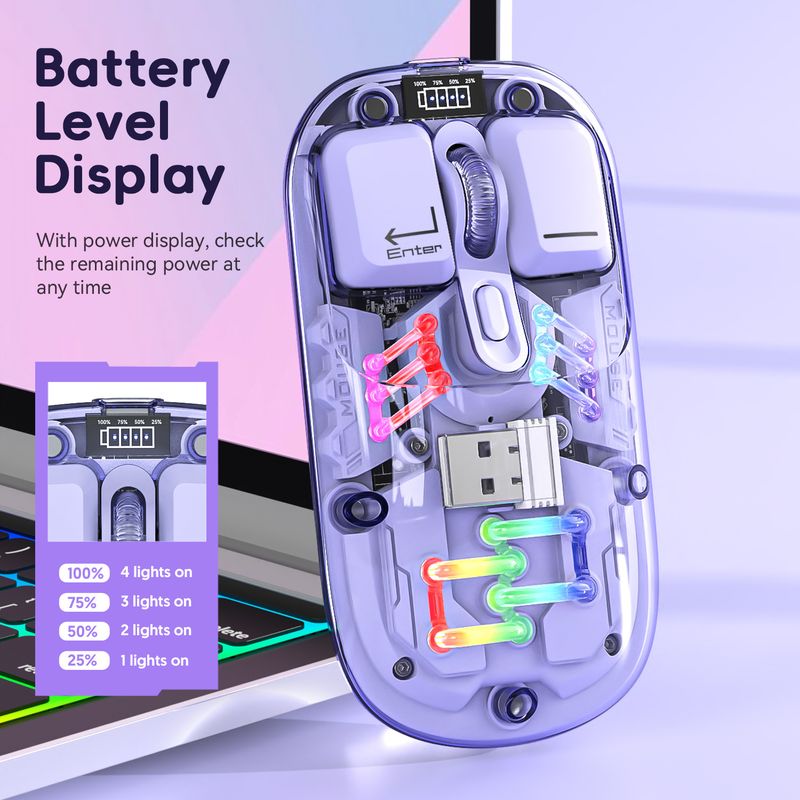
Battery display: 4-bar battery display key can be switched
Wireless distance: 10 meters
Charging interface: Type-C interface
Charging cable length: 30cm
Product size: 11.3x5.8x2.5cm
Product weight: 72g
Packaging size: 12.3x7.5x
3.5cm
Packaging weight: 115 g
Package includes :
1 x 2.4G+BT5
.0 Wireless Mouse
1 x USB Receiver
1 x Type-C Charging Cable 30CM
1 x Instruction manual
Operating systems:
Windows Vista
yes, Win7/8/10/11, ac OS X10.5 and later
Light operation:
Turn on the mouse switch, after successful connection, press the bottom button
of mouse Lighting mode switch key turn on the light mode
11 + 1 lighting modes can switch the light effectPress and hold
To turn off the light mode, press and hold to switch 11 light
effects
2.When there is no action on the mouse within 10 minutes, the mouse
will enter standby mode and all lights will be turned off
3.After entering sleep mode, press any key to re-enter connection and
The lights will automatically turn on
Installation and use steps: lower schematic:
12.4G wireless connection method:
Switch the button to 2.4G mode, plug in the USB receiver, the blue light is flashing, the mouse can be used. Power off when the switch is in the center position
position
2BT5.0 wireless connection method:
Switch t
Switch the BT mode button to BT, the blue light is flashing, the PC will automatically search for BT5.0 and confirm it, then it can be used; if you want to connect another PC, please switch the BT mode again and press the left button
Press the middle key for 3 seconds at the same time, the PC will search for the BT signal and choose to connect


Vidéos
Vidéos pour ce produit